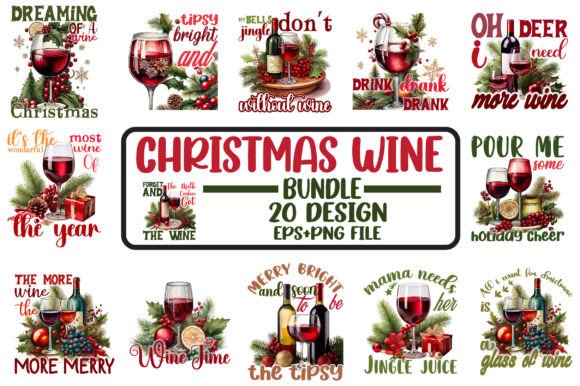
Christmas SVG Bundle 8: A Practical Resource for Designers and Creators
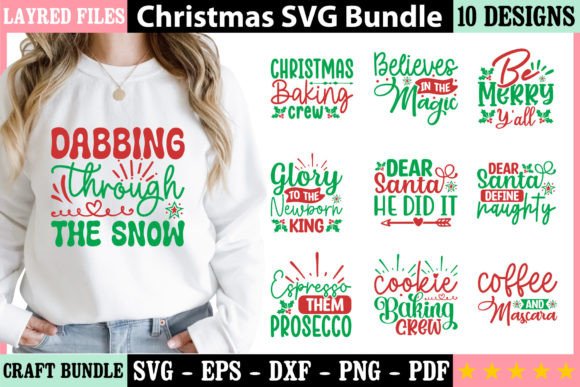
When assembling a library of seasonal design assets, the quality and versatility of each file matters. Christmas SVG Bundle 8 offers a focused collection of vector graphics intended for a wide range of creative projects. This bundle includes 10 SVG, 10 PNG, 10 EPS, 10 DXF, and 10 PDF files, all built from the same vector base. For anyone producing holiday-themed work, understanding what this bundle delivers and how it performs in practice can help determine whether it fits your workflow.
What the Bundle Contains and Why It Matters
A single SVG file is useful, but a bundle that provides multiple formats across the same set of designs adds real flexibility. Christmas SVG Bundle 8 gives you ten unique graphic motifs, each available in five file types. That means you can open, edit, and output the same design in vector editing software, raster applications, CAD-based tools, or print workflows without converting or re-creating artwork.
The formats included cover a practical range:
- SVG – Scalable vector format suitable for web, Cricut, Silhouette, and most vector editors.
- PNG – Raster image with transparency, ready for digital use or quick preview.
- EPS – Legacy vector format compatible with professional design applications.
- DXF – Common exchange format for laser cutting, CNC, and CAD software.
- PDF – Portable document format for printing and sharing.
Having all ten designs available in each format means you can move from screen to physical output without extra steps. This is especially valuable when working across multiple tools or collaborating with others who use different software.
File Quality and Technical Specifications
Each file in Christmas SVG Bundle 8 is described as 100% vector, with a resolution of 300 DPI and CMYK color mode. These specifications matter for both print and digital production. Vector files remain resolution-independent, so resizing does not degrade quality. At the same time, the 300 DPI and CMYK setting means the PNG and PDF variants are ready for commercial print work without additional adjustment.
The CMYK color space is worth noting because many free or low-cost design assets default to RGB. If you produce printed materials like flyers, cards, or signage, having CMYK files saves time and avoids color shifts between screen and press. For screen-only projects, converting to RGB is straightforward, but starting in CMYK gives you more latitude if a project later moves to print.
Every vector file is resizable, and the bundle supports easy color changes. This is standard with well-constructed vector assets, but it is still important to verify that paths are clean and layers are logically organized. From a usability standpoint, these files should open in Adobe Illustrator, Affinity Designer, Inkscape, and similar applications with minimal friction.
Multi-Format Coverage
The most direct strength of Christmas SVG Bundle 8 is format diversity. Instead of purchasing one SVG set, one PNG set, and so on, you get all formats in one purchase. For a small business owner creating both digital marketing graphics and physical products, this reduces the number of separate assets you need to manage.
Consistent Design Language
Because all ten designs come from the same vector source and appear in every format, the visual style remains consistent across outputs. If you are building a cohesive holiday campaign, using graphics from a single source helps maintain a unified look across social media, printed collateral, and product packaging.
Print-Ready Specifications
The combination of 300 DPI and CMYK means the PNG and PDF files are production-ready. For a freelancer or small business printing holiday cards, gift tags, or promotional materials, this eliminates the need to convert or upscale assets. You can send these files directly to a print provider or import them into layout software with confidence.
Broad Compatibility
With SVG, EPS, DXF, and PDF included, the bundle supports a wide range of tools. Cricut Design Space, Silhouette Studio, Adobe Suite, CorelDRAW, and even browser-based editors can open at least one of the provided formats. The DXF files also make the bundle suitable for laser engraving or vinyl cutting, which expands its utility beyond purely digital design.
Real-World Use Cases and Applications
Christmas SVG Bundle 8 can be applied in many contexts. Here are a few scenarios where the bundle performs well:
- T-shirt and apparel design: Use the SVG or EPS files directly in your design software, adjust colors to match branding, and output for screen printing or heat transfer.
- Card making and stationery: The PDF and PNG files are ready for print-on-demand services or home printing. The CMYK mode helps ensure colors reproduce accurately on paper.
- Vinyl decals: Load the SVG or DXF files into your cutting machine software. The vector paths should cut cleanly, and the crisp design lines work well for both small and large decals.
- Sign making: Resize the vector files without losing sharpness. Whether you are making small tabletop signs or larger window displays, the resolution remains consistent.
- Scrapbooking and craft projects: Print the PNG files at 300 DPI for crisp images, or cut the designs with a die-cutting machine using the DXF or SVG format.
- Social media and digital graphics: Use the PNG files directly or import the SVGs into Canva or similar tools for quick customization.
For educators and bloggers, the bundle provides ready-to-use graphics for holiday worksheets, blog visuals, or printable activities. The file formats are common enough that they integrate into most workflows without requiring specialized software.
Who Benefits Most from Christmas SVG Bundle 8
This bundle is best suited for individuals and small teams who produce their own designs and need reliable, multi-format assets. Freelance graphic designers can use the files as components in client projects. Small business owners managing their own marketing and product lines save time by having print-ready and cut-ready files in one place. Hobbyists working with Cricut or Silhouette machines will appreciate the SVG and DXF options, as these are the most commonly required formats for those platforms.
Professionals who work across both print and digital media will find the CMYK and high-resolution specifications particularly useful. If your workflow involves frequent file conversion or color correction, the bundle reduces those extra steps.
On the other hand, designers who need very large sets of graphics, or who require highly complex or intricate vector work, may find the ten designs appropriate for smaller projects but not sufficient as a primary library for a full holiday season. Similarly, someone who only needs PNG files for social media might pay for formats they will never open. In that case, the value depends on how often you might expand into different output methods later.
Quality and Reliability Considerations
The bundle promises vector files that are easy to color change and resize. In practice, this depends on how the designs are constructed. Well-made SVG files use closed paths and logical grouping, making recoloring simple. The description suggests the files meet this standard, which is consistent with most professionally prepared vector bundles in this category.
For the DXF format, compatibility can vary slightly depending on the software version and import settings. Most modern CAD and cutting applications handle DXF files well, but double-checking scale and units before cutting is always a good habit. The PDF files should be print-ready, but verifying embedded fonts and image placement is recommended if you are combining them with other elements in a layout.
One limitation to consider is that the bundle does not specify whether the designs are layered or grouped in a particular way. If you need to isolate individual elements frequently, opening the file and checking the structure before starting your project will save time. For most users, the standard vector file construction will be sufficient for color changes and resizing.
Long-Term Value and Flexibility
Because vector files do not degrade with scaling, Christmas SVG Bundle 8 retains its value over repeated use. You can store the files and reuse them year after year, adjusting colors or combining them with other graphics as needed. The multi-format approach also means that if you change software or add a new machine to your workshop, the same designs remain usable without repurchasing assets.
For a small business that runs holiday promotions annually, investing in a bundle with clean vectors and print-ready files pays for itself over several seasons. The cost per design, when divided across formats and years of reuse, is low compared to commissioning custom artwork or purchasing individual files each time.
Final Thoughts
Christmas SVG Bundle 8 is a practical, well-rounded collection for anyone who needs holiday graphics across multiple formats and output types. Its strength lies in format coverage, print-ready specifications, and consistent design language across all ten motifs. Freelancers, small business owners, crafters, and educators will find the bundle saves time and reduces file conversion headaches. While it may not suit someone requiring a very large volume of unique designs, for focused holiday projects, it provides reliable assets that work from screen to print to cut. If your workflow demands flexibility and professional output specifications, this bundle is worth considering for your seasonal resource library.