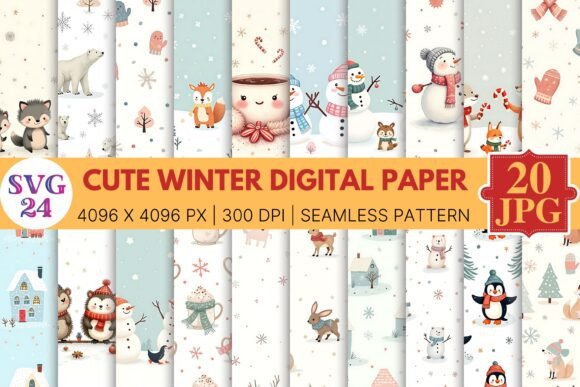
Integrating Cute Winter Digital Paper into a Structured Creative Workflow
Building an efficient creative pipeline depends heavily on the quality and versatility of your foundational assets. For professionals and dedicated hobbyists navigating seasonal projects, sourcing reliable digital materials that function seamlessly across both digital interfaces and physical print production is a critical step. The Cute Winter Digital Paper collection is designed as precisely this type of versatile resource—a cohesive set of 20 seamless pattern backgrounds built on a technical standard that supports rigorous, multi-platform use. Understanding how to strategically integrate such a pack into your existing processes can significantly streamline production, maintain visual consistency, and extend the lifespan of your creative output.
Technical Specifications and Their Role in Workflow Compatibility
Every digital asset carries technical constraints and opportunities. The specifications of this particular pack—4096 x 4096 pixels, 300 DPI, JPG format—are not arbitrary numbers. They represent a deliberate standard designed to reduce friction during both the design and execution phases of a project. High resolution at 300 DPI ensures that the patterns are print-ready for commercial applications such as product packaging, cards, and signage without requiring extensive upscaling or interpolation, which can degrade image quality.
Simultaneously, the 4096px canvas size provides ample resolution for large-format digital displays, such as website hero backgrounds or tablet wallpapers, where retina or high-PPI screens demand crisp detail. The universal JPG format guarantees that the files will be recognized natively by nearly every design tool, operating system, and web platform. This eliminates conversion bottlenecks when moving assets between team members who may use different software suites, whether it is Adobe Photoshop, Canva, Procreate, Affinity Photo, or web-based storefront builders.
Pre-Production: Strategic Planning and Asset Auditing
Effective asset integration begins before a single file is opened in your design software. Seasonal campaigns, whether for a business or a personal blog, benefit from advance planning. A pack like Cute Winter Digital Paper should be reviewed early in the planning phase to align its color palette, motifs, and overall aesthetic with your upcoming content calendar.
Mood Boarding and Client Alignment: Use the JPG files directly to populate mood boards or style tiles. Because the pack contains 20 distinct seamless patterns, you can quickly present a range of directions to a client or collaborative partner without needing to source multiple disparate assets. This accelerates the approval process and ensures everyone is aligned on the visual direction before detailed work begins.
Auditing Against Existing Libraries: Before starting a new project, compare the patterns in this pack against your existing asset library. Identify gaps that this collection fills—perhaps you were missing a subtle, repeating snowflake motif for a background texture, or a bold plaid pattern for accent elements. Understanding your library's composition allows you to leverage the new pack precisely where it adds the most value, reducing the time spent searching for or creating missing elements mid-project.
Organizational Integration: Create a dedicated folder structure upon acquisition. A recommended hierarchy might include a master folder for Seasonal Assets, subfolders for Winter, and then specific folders for Patterns. Renaming the files with a consistent convention—such as WinterPaper_01_SnowflakeSeamless.jpg—improves searchability within your operating system or digital asset management (DAM) software. This upfront organization directly impacts retrieval speed during tight production deadlines.
Core Execution: Implementing Seamless Patterns Across Platforms
The true measure of an asset's value is how smoothly it integrates into the active design and production workflow. The technical and structural characteristics of this digital paper pack enable several efficient implementation methods.
Application in Raster-Based Design Tools
In software like Adobe Photoshop or Affinity Photo, the high-resolution seamless patterns can be imported and defined as a pattern swatch or tiled fill. Because the patterns are seamless, you can fill a canvas of any size without visible seams or repetition artifacts. This is particularly useful for creating large mockup backgrounds, digital scrapbooking layouts, or consistent textures for 3D renderings. The 300 DPI ensures that when you scale the pattern down for a specific element, it retains exceptional sharpness.
Integration with Web and UI Platforms
For bloggers and web designers, these patterns serve as efficient background assets for website headers, email newsletters, or social media templates. The 4096px width allows the pattern to cover standard high-definition screens without tiling visibly. In platforms like Canva or Squarespace, you can upload the JPG directly and use it as a background image. To maintain fast page load times for web use, create compressed derivatives of the original files (e.g., saving for web at 72 DPI with reduced quality) while keeping the original 300 DPI files archived for print projects. This dual-version strategy optimizes performance without sacrificing the source quality.
Batch Production for Print and Packaging
Small business owners and stationery designers often need to produce multiple items with a cohesive look. The 20 distinct patterns allow for systematic batch processing. For example, you can assign pattern one to gift tags, pattern two to wrapping paper backgrounds, and pattern three to thank-you cards. Using actions or scripts in your design software, you can automate the placement of these patterns into pre-designed templates, dramatically reducing the time required to produce a complete product line. The consistent resolution across all 20 files means you do not need to adjust scaling settings for each individual design; your template locks in the placement, and the asset fits perfectly every time.
Quality Control and Consistency Throughout the Process
Maintaining a professional standard requires deliberate quality checks at multiple stages of the workflow. Even with high-quality assets like these seamless patterns, oversight is necessary to ensure the final output matches your intent.
Color Space Management: Digital files typically exist in the RGB color space, while commercial printing often requires CMYK. Before sending a design to print, verify that the conversion from RGB to CMYK preserves the desired vibrancy of the patterns. Run a test print on your specific paper stock to check for color shifts. The 300 DPI specification is ideal for printing, but color accuracy depends on your printer profile and software settings.
Scale and Proportion Testing: A seamless pattern that looks perfect on a 5x7 inch card may overwhelm or underwhelm on a large poster. Test the pattern at your intended output size. Because the original asset is 4096x4096 px, you have significant flexibility to scale the pattern up or down. For large-scale applications, such as wallpaper or roll-up banners, ensure the pattern resolution remains acceptable at the final dimensions. For digital use, pay attention to how the pattern interacts with overlaid text or UI elements—busy patterns may require a transparent overlay to reduce contrast and maintain readability.
Consistency Across Deliverables: When using multiple patterns from the same pack within a single project (e.g., a website with different sections), verify that the visual weight and complexity of the patterns complement rather than compete with each other. The cohesive design language of the Cute Winter Digital Paper collection simplifies this task, but it is good practice to assemble a style guide that maps specific patterns to specific deliverables or sections before finalizing the design.
Post-Production, Archiving, and Long-Term Asset Repurposing
The lifecycle of a digital asset extends far beyond a single campaign. A structured approach to post-production and archiving ensures your resources retain their value for future projects.
Systematic Archiving: After a project concludes, move the original, untouched JPG files into a long-term storage solution. Tag the files with relevant metadata—keywords such as winter, seamless, pattern, holiday, snowflake, plaid—so they are retrievable during next year's planning phase. Using descriptive filenames and consistent folder hierarchies eliminates the need to re-audit your library each season.
Repurposing for Recurring Cycles: Because this pack is seasonal rather than event-specific (e.g., not tied to a single year's trend), it can be repurposed for annual winter campaigns, year-end sales, or general cold-weather content. The 20 unique patterns provide enough variety to rotate elements each year, preventing your content from feeling stale. For instance, use a different subset of the patterns each season while maintaining the same overall aesthetic framework.
Retrospective Workflow Analysis: After completing a large project using these assets, take a few minutes to evaluate how the pack performed within your workflow. Did the resolution meet your print needs? Were the files easy to organize and retrieve? Did the seamless nature of the patterns save you time compared to creating backgrounds from scratch? Documenting these observations helps you make more informed purchasing and planning decisions in the future, building a personal or organizational knowledge base around asset efficiency.
By approaching Cute Winter Digital Paper not simply as decorative images but as functional components of a larger production system, you position yourself to execute seasonal projects with greater speed, consistency, and professional polish. From pre-production planning and seamless technical integration to quality control and long-term archiving, each step benefits from the structural qualities of the asset pack. Whether you are a freelancer delivering a client campaign, a small business owner preparing holiday packaging, or a hobbyist documenting winter memories through digital scrapbooking, the strategic implementation of these patterns directly enhances both the process and the final outcome.