Jewelry Care Instructions Card Template: Streamlining Customer Communication and Brand Consistency
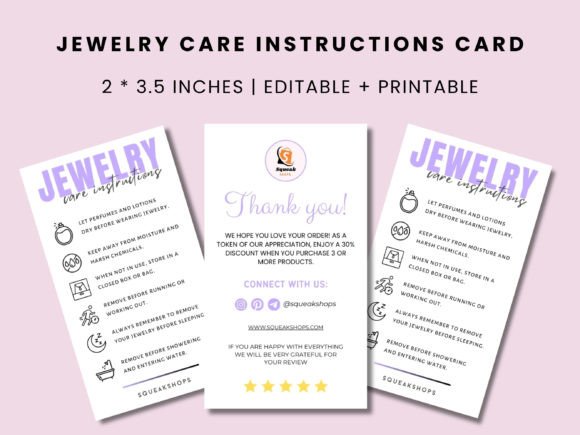
Every jewelry piece that leaves your shop carries more than metal and stones—it carries your reputation. Customers expect their purchase to stay beautiful for years, and a well-crafted care instruction card bridges that expectation with reality. But creating those cards from scratch for every product line, material, or season wastes time and invites inconsistency. That is where a Jewelry Care Instructions Card Template transforms a repetitive task into a repeatable process. With a customizable Canva template, you gain a practical asset that fits directly into your fulfillment workflow, ensuring every customer receives clear, professional guidance without reinventing the wheel each time.
Why a Dedicated Jewelry Care Instructions Card Template Matters
Jewelry care instructions are not afterthoughts—they are a critical touchpoint in the post-purchase experience. When a customer knows how to clean, store, and maintain their new piece, they are less likely to encounter tarnishing, scratches, or breakage. That reduces returns, builds trust, and encourages repeat purchases. A template standardizes this information so you can focus on the content itself—what care steps are relevant for sterling silver, gold vermeil, gemstones, or plated metals—rather than formatting and layout every time.
Beyond customer satisfaction, a care card reinforces your brand identity. The design, color palette, typography, and tone all communicate professionalism and attention to detail. By using an editable printable template, you can align the card with your packaging, website, and social media aesthetics. This consistency is the backbone of a cohesive brand experience, whether you are a solo artisan packaging by hand or a growing business outsourcing production.
Before Fulfillment: Preparing the Template
Your workflow starts long before an order is placed. When you first download the Jewelry Care Instructions Card Template, the key task is customization. Open the Canva template and review the placeholder text. Replace generic phrases with your specific care recommendations based on the materials you sell. For example, if you offer both plated and solid gold items, you might need two variations or a single card that covers multiple material types. Use the front side for quick tips (e.g., "avoid water and lotions") and the back for detailed steps (e.g., "polish with a soft cloth after each wear"). This bit of upfront planning saves hours later.
Next, check the file format compatibility. The template comes in US letter (8.5 × 11 inches) and A4 (8.3 × 11.7 inches) sheet sizes. Decide whether you will print at home or use a professional printer. For home printing, ensure your printer settings match the page size. For professional printing, export a high-resolution PDF from Canva. Set your color space to CMYK if possible to maintain color accuracy. This preparation step eliminates last-minute rescaling or color shifts that could waste paper and time.
During Order Processing: Using the Template Efficiently
When an order comes in, you can quickly produce the correct card by referencing your prepared template. If you have multiple product categories, create duplicate templates in Canva and rename them (e.g., "Silver Care – Front", "Gold Care – Back"). This keeps your design consistent while allowing material-specific details. Drag and drop the relevant card into a printing queue or export it as needed. Since the template is fully editable, you can also adjust language for seasonal promotions or limited-edition collections without rebuilding the layout.
After Fulfillment: Including the Card in Packaging
The card's placement in your packaging affects the customer's unboxing experience. Print on sturdy cardstock (at least 120gsm) so the card retains its shape when tucked inside a jewelry box or pouch. Place it on top of the item or inside a small envelope—visibility matters. A care card that gets buried under tissue paper may be overlooked. Also consider adding a subtle QR code that links to a video or extended care guide on your website. This adds value without cluttering the card's design.
Practical Implementation Tips for Your Editable Template
- Content first, design second: Write the care instructions before you start customizing colors. Focus on clarity: use short sentences, bullet points for steps, and icons if space allows. Avoid jargon—your customer may not know what "patina" or "electroplating" means.
- Test print one sheet: Before printing a bulk run, print a single card on your chosen paper. Check alignment, bleed margins, and color fidelity. Adjust the Canva file if text runs too close to the edge.
- Use both sides effectively: The front should grab attention with a headline like "Keep Your Jewelry Sparkling". The back can hold detailed care tips, a return policy reminder, or a thank-you note. Avoid cramming too much on either side.
- Create a master template and variants: In Canva, duplicate the template for each material category. This preserves your base design but allows separate edits for silver, gold, rose gold, or gemstone care. Naming conventions keep you organized.
- Incorporate your brand elements: Upload your logo, brand colors, and fonts to Canva so every card matches your website, social media, and other packaging. Consistency reinforces professional trust.
How This Template Interacts with Other Tools and Assets
The Jewelry Care Instructions Card Template does not exist in isolation. It connects with several parts of your operation. First, it integrates with Canva, a browser-based design platform that works on any device. You can edit the template on a laptop, tablet, or phone, making it easy to update details while on the go. Second, the template interacts with your brand guidelines. If you have a style guide for fonts, colors, and imagery, apply those directly in Canva. Third, the card should coordinate with other packaging items—business cards, thank-you notes, and product tags—to create a unified unboxing experience.
From a process perspective, the template also interacts with inventory tracking. If you have different products with distinct care requirements, assign each product SKU to a specific template variant. When printing, you can sort orders by material and batch print the correct cards. This reduces the chance of mixing up instructions (e.g., sending silver care info with a gold piece). For larger operations, consider linking the template to a digital asset management system where team members can access the latest version.
Small Handmade Jewelry Business (Solopreneur)
You design and produce all pieces yourself. Your time is split between crafting and administrative tasks. Using a single Jewelry Care Instructions Card Template saves you from writing care notes manually on each order. Customize the template once with your generic care tips, then print multiple copies at home on inkjet-friendly cardstock. Store pre-printed cards in a drawer near your packing station. When an order comes in, grab one card, fold it, and insert it into the box. This simple system cuts packing time by 2–3 minutes per order—time you can reinvest in making new pieces.
Growing Brand with Multiple Collections
Now you have silver, gold, and pearl collections. Each requires different care advice. Instead of one static card, you create three versions in Canva. You export high-resolution PDFs for each and send them to a local print shop for larger runs. You store the PDFs in a shared Google Drive folder accessible to your part-time assistant. When packing orders, you read the product SKU, pull the matching card, and include it. This ensures accuracy without requiring the assistant to memorize care instructions. The template's editable nature lets you quickly update information if you later add a new material, such as enamel or brass.
Ensuring Quality Control and Long-Term Use
Quality control for your care cards is about content accuracy and visual consistency. Over time, your materials or care recommendations might change—perhaps you switch to a different anti-tarnish method or discover that a certain gemstone reacts with a common cleaning solution. Because the template is editable, you can update the text in Canva and reprint only the affected cards rather than discarding entire stock. Set a reminder every quarter to review your care instructions and compare them with industry standards. This practice aligns with E-E-A-T—showing that you are an expert who keeps information current.
For long-term use, maintain a change log. Note the date and nature of each edit (e.g., "2025-01-15: Added care tips for moonstone"). This helps you track which version customers are seeing and lets you revert changes if needed. Also keep a clean master template untouched, so you can always start fresh without sifting through multiple edits. When you print a new batch, compare the printout to your digital master to catch any drift in color or layout.
Making Care Instructions a Seamless Part of the Customer Experience
The ultimate goal is to deliver a care card that feels intentional, not an afterthought. When customers unwrap a jewelry piece and find a neatly printed card with practical advice and your brand's personality, they perceive higher value. They are more likely to follow the instructions, wear the jewelry correctly, and return for future purchases. The Jewelry Care Instructions Card Template removes friction from your process—no more struggling with alignment in word processors, no more inconsistent fonts, no more forgetting to include a card in the package.
By integrating this template into your pre-order preparation, order fulfillment, and post-shipment touchpoints, you turn a routine administrative task into a brand-building opportunity. Your workflow becomes efficient, your communication clear, and your customers informed. Whether you run a one-person studio or a multi-product line, an editable printable template gives you the structure to scale care instructions without sacrificing quality. Download it, customize it, and let it carry part of your brand story with every piece of jewelry that leaves your hands.