Using the Father’s Day T‑shirt Red Mockup for Clean Product Presentations
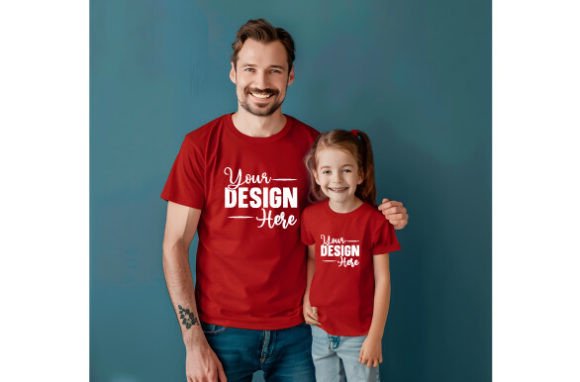
If you sell custom apparel or create designs for clients, showing a finished piece on a blank white background rarely tells the full story. People respond better when they see your artwork on a realistic garment, especially when that garment has color, texture, and lighting that mirrors what the final product will look like. That is exactly where the Father’s Day T‑shirt Red Mockup 5 fits: it gives you a ready‑to‑use digital canvas so you can drop your design onto a vivid red shirt and present it in a way that feels tangible. Whether you are launching a seasonal collection, preparing files for a print‑on‑demand partner, or building a portfolio piece for a client review, this mockup simplifies the gap between your original artwork and the finished product.
What the Mockup Actually Does in Your Workflow
A digital mockup like the Father’s Day T‑shirt Red Mockup 5 is not a design tool in the traditional sense. It does not help you create vector art, choose typography, or adjust color palettes. Instead, it serves as a presentation layer. You place your completed design into the mockup file, and the result is a photorealistic image that looks like a professionally shot product photo. This matters most at two points in any apparel project: before you commit to production, and when you start marketing to your audience.
Before production, a mockup lets you test how a design sits on the fabric, where the print boundaries fall, and whether the scale of your artwork feels right on a shirt that someone will actually wear. You can catch issues like a logo that sits too low or a graphic that gets lost against the red background—without spending money on a physical sample. After you finalize the design, the same mockup becomes the asset you use for product listings, social media posts, email newsletters, or client approvals. It replaces the need for a photoshoot, which saves time and helps you maintain a consistent visual style across all your products.
How It Fits into a Broader Creative or Business Process
Most people who buy mockups like this one fall into two categories: independent creators who sell through print‑on‑demand platforms, and small business owners who produce their own inventory. Both groups follow a similar sequence that the mockup supports at several stages.
Phase one: planning and preparation. Before you open any design software, you need to understand the constraints of the garment. The red mockup gives you a fixed canvas with known dimensions, print area guides, and realistic shadows. If you are designing for Father’s Day specifically, you can sketch ideas while looking at the mockup to ensure your concept works with the shirt color. This avoids the common mistake of designing something that looks great on a white screen but feels disconnected from the product color.
Phase two: design and iteration. When you place your artwork into the mockup, you can immediately see how it reads on the red fabric. You might decide to adjust contrast, add an outline, or resize elements so they do not blend into the shirt. The high resolution of this particular file—300 DPI at full quality—means you can zoom in and inspect fine details without pixelation. This is especially useful if your design includes small text or intricate line work that needs to remain legible when printed.
Phase three: review and approval. Whether you work alone or with a team, the mockup serves as a shared reference. You can send the PNG or JPG version to a collaborator, client, or production partner and discuss adjustments before anything goes to print. Because the file is a realistic representation, there is less back‑and‑forth about how the final shirt will look.
Phase four: marketing and sales. Once the design is approved, you export the mockup image and use it across your sales channels. For an e‑commerce site, you might show the design on the red shirt as the primary product image. For social media, the same image works in a carousel that highlights different angles or details. If you run paid ads, a mockup image often performs better than flat artwork because it feels like an actual product, which builds trust with potential buyers.
Practical Implementation Tips
Getting the most out of the Father’s Day T‑shirt Red Mockup 5 comes down to how you prepare your design file and how you organize your assets. Here are a few observations from real use:
- Use smart objects if your software supports them. Most mockup files are built with a layer structure that lets you double‑click to insert your design. Keep your artwork at the same resolution as the mockup—300 DPI—so the final image stays sharp. If you scale a low‑resolution design up, the mockup will reveal the blurriness, which defeats the purpose of a high‑quality presentation.
- Match your design color to the shirt color. Red is a strong background. Darker designs with high contrast typically work well, but lighter colors can get washed out. Before finalizing, place a few variations of your artwork into the mockup and compare them side by side. This helps you choose the color version that stands out most on the red fabric.
- Keep a layered working file. The download includes a PNG and a JPG. The PNG preserves transparency and is better for editing, while the JPG is smaller and works well for quick sharing. If your design process is iterative, keep the PNG version as your master file and export JPG or smaller PNG copies for previews and approvals.
- Organize your mockups by color and style. If you own several mockups, store them in a folder structure that lets you find the right background quickly. For example, you might have subfolders for “red shirts,” “black shirts,” “hoodies,” and “caps.” When you need to present a Father’s Day design, you can immediately pull the red mockup without digging through unrelated files.
How the Mockup Interacts with Other Tools and Platforms
This type of mockup is a static image file that works with any graphic design application that can open PNG or JPG layers. Adobe Photoshop users have the most flexibility because of layer support and smart object functionality, but you can also insert your design using free tools like GIMP, Canva (if you treat it as an overlay), or even preview it in a basic image editor. The key requirement is that you can place your artwork on top of the mockup and resize or position it until it aligns with the shirt area.
If you use print‑on‑demand services like Printful, Printify, or Teespring, you might normally upload a flat design file to their mockup generator. But if your chosen platform does not offer a red shirt variant in its mockup tool, you can use this file to create your own listing images. This gives you more control over how your product is presented, and it ensures that every listing in your store has a consistent look even when the platform’s built‑in mockups vary in lighting or angle.
For those who sell on marketplaces like Etsy or Amazon, product photography guidelines often require clear, well‑lit images. A high‑resolution mockup meets those requirements because it shows the product in a realistic way without the distractions of a cluttered background. You can also crop the mockup image to focus on the shirt itself, which helps your listing stand out in search results.
Efficiency and Quality Control Considerations
Speed matters when you are producing multiple designs, especially around a holiday like Father’s Day when timing affects sales. A good mockup reduces the time you spend on presentation because you do not need to shoot photos, adjust lighting, or clean up backgrounds. You open the file, insert your design, and save. If you batch your work, you can prepare ten designs in one session by having the mockup open as a template and cycling through each design file.
Quality control happens naturally when you view your design on the mockup. The realistic lighting and shadows reveal issues that might stay hidden on a flat canvas. For example, a design that looks centered in your editing software might appear slightly off when viewed on the 3‑D shape of the shirt. The mockup lets you catch that misalignment before you publish the listing or send the file to production.
Long‑term use is straightforward. The download is a digital file, so you can reuse it indefinitely. Store it in a location you can access from your design machine, and keep a backup in cloud storage. Since the file does not degrade, every design you create can benefit from the same consistent presentation. Over time, this consistency builds a recognizable visual style for your brand, which helps customers trust the quality of your products even before they purchase.
Bringing It All Together in Your Routine
If you already have a design workflow that involves flat artwork or basic product images, adding the Father’s Day T‑shirt Red Mockup 5 is a small change that improves how your work is received. It fits into the preparation, review, and marketing stages without requiring new software or complicated steps. You prepare your design, place it into the mockup, and then use the resulting image wherever you need a realistic product shot.
The practicality of this mockup comes from its simplicity. It is a single asset that solves a recurring problem: how do you show someone what your design will look like on a real shirt, without spending time and money on photography? For a creator, an entrepreneur, or a marketer who needs to move from concept to customer quickly, that question matters. A clean, high‑resolution mockup gives you a straightforward answer.